How to delete WhatsApp Business account and connect to BotBee as fresh number
If you're planning to connect your number to the WhatsApp API, starting fresh is often the best approach. This involves properly deleting your existing WhatsApp Business account and clearing any previous configurations. In this guide, we’ll walk through the step-by-step process to reset your number and prepare it for seamless API integration.
Step 1: Delete Your WhatsApp Business Account:
To begin the process, you need to remove your existing account from the WhatsApp Business app.
- Open the WhatsApp Business app
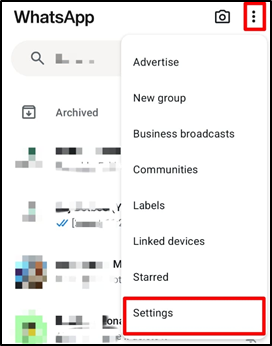
- Tap on the three-dot menu (top right corner)
- Go to Settings
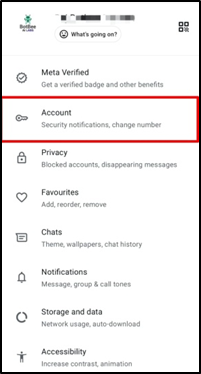
- Click on Account.
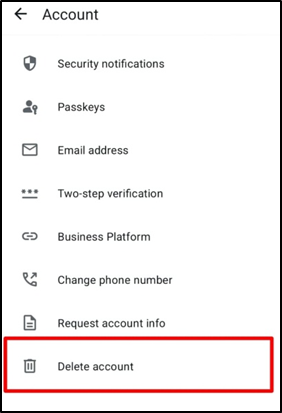
- Click on Delete Account
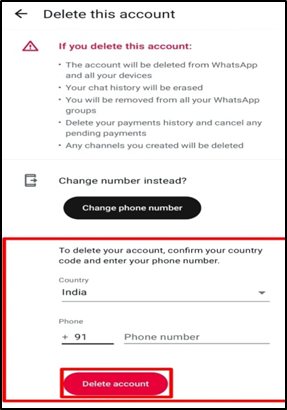
- Enter your country code and phone number
- Confirm to delete the account
- This will permanently remove your WhatsApp Business account, allowing you to proceed with a fresh setup for API integration.
Once your WhatsApp Business account is deleted, your number is now ready to be set up again.
You can now connect this number as a fresh account in BotBee and proceed with the WhatsApp API integration without any previous conflicts or configurations.
Refer to this guide to know how to connect fresh number to BotBee: Whatsapp Business API Onboarding Guide
Reference Video:
If you prefer video tutorials here are the links:
English: https://youtu.be/Oi3JZA07Xss?si=b-ikU3nmtA8MPQ_e
- Take a screenshot or screen recording.
- Share details with our support team.
Found this article helpful?
( 3 Out of 6 Found Helpful )